


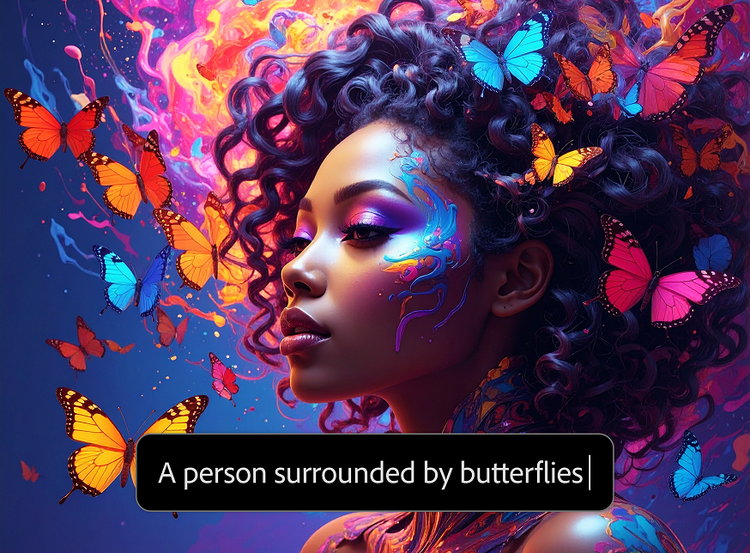
Creating a high-quality visual once required photography equipment, illustration skills, or hours of work in a design application. Today, artificial intelligence has changed that process. Text-to-image technology allows users to describe a scene in ordinary language and generate a visual interpretation within seconds.
This technology is becoming useful for designers, marketers, content creators, educators, storytellers, and businesses that need visual material without producing every image from scratch. However, getting useful results involves more than simply entering a few words. Understanding how the technology works and how to communicate an idea clearly can make a significant difference.
What Is Text-to-Image AI?
Text-to-image AI is a type of generative artificial intelligence designed to create images from written descriptions. A user might enter a prompt such as:
“A small wooden cabin beside a misty mountain lake at sunrise, realistic photography, soft natural lighting.”
The system interprets the description and generates an image that attempts to match the requested subject, environment, composition, style, and atmosphere.
Modern image-generation systems are generally trained using very large collections of visual data and associated textual descriptions. During training, the models learn relationships between language and visual characteristics. When a user supplies a new prompt, the system uses those learned relationships to construct an image corresponding to the description.
How Does an AI Image Generator Turn Words Into Pictures?
Although the underlying technology is complex, the basic process can be understood in a few stages.
1. Understanding the Prompt
The first step is interpreting the user’s written instructions. An AI system analyzes concepts such as objects, people, locations, actions, colors, styles, lighting, and relationships between different elements.
For example, a prompt describing “a red bicycle leaning against a brick wall on a rainy street” contains several visual components. The model needs to understand not only the individual concepts but also how they relate to one another.
2. Converting Language Into Visual Guidance
The text is transformed into information the image-generation model can use as guidance. In modern systems, text-processing components help connect the language in the prompt with visual patterns learned during training.
This is why descriptive prompts can influence characteristics such as composition, mood, perspective, and artistic style.
3. Generating the Image
Many modern text-to-image systems use diffusion-based methods. In simplified terms, the generation process begins with random visual noise and progressively transforms it into an image that aligns with the prompt.
The model repeatedly estimates what should change during the generation process until recognizable objects, shapes, textures, colors, and other details emerge.
4. Refining the Result
After the initial image has been generated, some platforms provide additional tools for refinement. Users may be able to regenerate an image, modify particular elements, adjust its appearance, change the composition, or increase its resolution.
This makes AI image generation less like pressing a single button and more like an iterative creative process.
Why Prompt Quality Matters
The quality of an AI-generated image depends partly on how clearly the desired result is described. A short prompt such as “a beautiful city” leaves enormous room for interpretation.
A more specific prompt gives the system additional information:
Basic prompt:
“City at night.”
More detailed prompt:
“An atmospheric modern city street at night after rainfall, reflections on the pavement, illuminated storefronts, pedestrians carrying umbrellas, cinematic photography, shallow depth of field.”
The second version establishes a subject, environment, lighting condition, mood, and visual style. More detail does not automatically guarantee a better result, but relevant detail generally gives the model clearer creative direction.
For people exploring this technology, an AI image generator from text can provide a practical way to experiment with different descriptions and see how changes in a prompt affect the resulting image.
A Simple Structure for Better Prompts
A useful prompt does not need to be complicated. One practical structure is:
Subject + environment + action + visual style + lighting + composition
For example:
“A young explorer standing beside an ancient stone temple in a jungle, looking toward the entrance, cinematic realistic photography, warm morning light, wide-angle composition.”
You can add further details when they are important, including:
- Subject: What should appear in the image?
- Environment: Where does the scene take place?
- Action: What are the subjects doing?
- Style: Photorealistic, illustration, watercolor, 3D render, editorial, or another visual approach.
- Lighting: Golden hour, studio lighting, dramatic shadows, soft daylight, or neon lighting.
- Composition: Close-up, portrait, overhead view, wide shot, or symmetrical composition.
- Mood: Calm, mysterious, energetic, nostalgic, futuristic, or playful.
The goal is not to add words simply for the sake of making a prompt longer. Each detail should help define the intended visual result.
Common Uses of Text-to-Image Technology
AI-generated images have applications across many creative fields.
Content Creation
Bloggers and publishers can use generated visuals to illustrate concepts that may be difficult or expensive to photograph. This can be particularly useful for conceptual subjects, fictional scenes, and explanatory content.
Social Media
Creators frequently need a steady supply of graphics for posts, thumbnails, stories, and other formats. Text-to-image systems can help develop visual concepts quickly and allow creators to experiment with different styles.
Marketing and Advertising
Marketing teams can use AI-generated imagery during the concept-development stage. For example, a team might generate several visual directions for a campaign before deciding which concept deserves professional production.
Product Concepts
Designers can use generated images to explore early ideas for packaging, environments, product presentations, or advertising scenes. These images can function as visual references rather than final production assets.
Storytelling and Previsualization
Writers, filmmakers, game designers, and illustrators can use AI images to explore characters, locations, costumes, and scenes before creating finished work.
Education
Teachers and educational content creators can generate illustrations for subjects where suitable stock photography is unavailable or where an imagined scenario needs to be visualized.
AI Images Still Have Important Limitations
Despite rapid improvements, text-to-image technology is not perfect.
One common problem is inconsistency. A generated character may look slightly different from one image to another. Maintaining exactly the same appearance, clothing, proportions, and environment across a large collection of images can require additional tools or careful workflows.
AI systems can also struggle with precise details. Small objects, complex interactions, unusual perspectives, and specific arrangements may not always appear exactly as requested. Text rendered inside images has historically been another difficult area, although image-generation systems continue to improve.
Another limitation is that an AI-generated image can look convincing while still containing subtle visual errors. Users should therefore inspect important images carefully rather than assuming that photorealistic output is automatically accurate.
Think of AI as a Creative Assistant
One of the most useful ways to approach text-to-image technology is to treat it as a creative assistant rather than a complete replacement for human judgment.
AI can rapidly produce possibilities, but people still need to decide whether an image communicates the intended message. A designer may generate several concepts, select the most useful direction, and then refine the chosen result manually.
This human-in-the-loop approach is especially valuable for professional projects where brand consistency, factual accuracy, accessibility, and visual quality matter.
Responsible Use Matters
AI-generated imagery also raises questions about copyright, licensing, consent, and representation. Rules can vary depending on the platform, jurisdiction, source material, and intended use.
Before using an AI-generated image commercially, users should review the applicable platform terms and licensing requirements. They should also avoid creating misleading visuals that could reasonably be mistaken for authentic photographs, particularly when the subject involves real people, news events, or sensitive situations.
For businesses, keeping records of how important visual assets were created and checking usage rights can help reduce uncertainty later.
The Future of Text-to-Image Creation
Text-to-image technology is moving toward increasingly integrated creative workflows. Instead of generating an image as an isolated task, users can increasingly combine generation with editing, animation, video creation, resizing, and other production processes.
This development could make visual experimentation much faster. Someone with a written idea can move from a rough concept to several visual possibilities without first mastering every traditional design technique.
The technology does not eliminate the importance of creativity. Instead, it changes where creative effort is spent. Rather than manually producing every visual element, creators can spend more time developing concepts, selecting appropriate results, refining details, and deciding how an image should communicate with an audience.
Conclusion
AI image generation from text has made visual creation more accessible by allowing ordinary language to serve as a starting point for image production. Behind the simple interface are sophisticated models that interpret language, connect it with learned visual patterns, and progressively construct images based on the user’s instructions.
The best results usually come from treating the process as an iterative collaboration between human and machine. Clear prompts provide direction, experimentation reveals possibilities, and human review ensures that the final visual actually serves its purpose.
As the technology continues to evolve, understanding both its capabilities and limitations will become increasingly important for anyone working with digital content and visual communication.