
The Shift from Watching to Reading: Why Video Transcripts Are the New Blog Posts

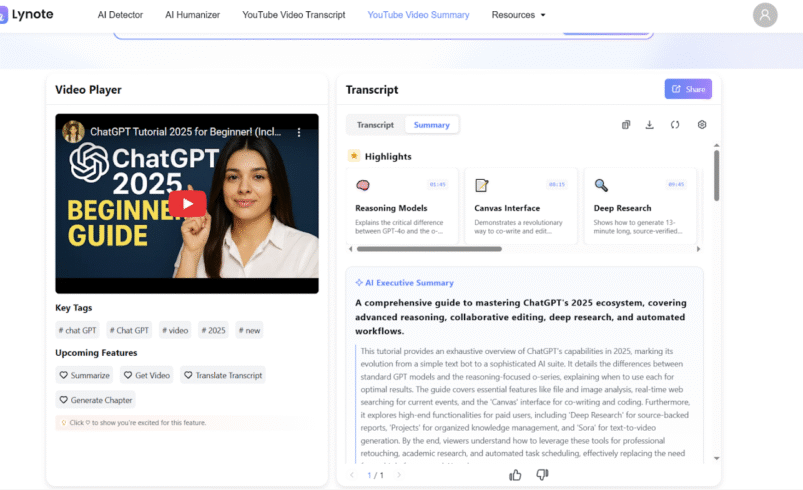
The internet is undergoing a subtle but profound shift in consumption habits. For the past decade, video has been king. We pivoted to video for entertainment, news, and education, driven by the rise of YouTube, TikTok, and streaming. But a counter-trend is emerging: the desire for efficiency and speed. The average human speaks at about 150 words per minute, but the average educated adult can read at 250-300 words per minute, and “skim” at nearly 1000 words per minute. We are realizing that while video is engaging for storytelling, it is highly inefficient for information retrieval. Lynote.ai is at the forefront of this shift, creating a hybrid “Read-Watch” experience that combines the best of both worlds.
Beyond the Play Button: The Hybrid Model Lynote.ai recognizes that the future isn’t just video, and it isn’t just text—it’s the seamless synchronization of both. The platform’s “Sync Playback” feature is a testament to this philosophy. It allows users to “read” a video. You scan the smart paragraphs to get the gist, and when you need the nuance of tone, a facial expression, or a visual demonstration, you click to watch that specific segment. This gives the user total control over the pacing of their consumption, rather than being held hostage by the video player’s timeline.
A Superior User Experience: Structure Over Chaos Compared to competitors like ScreenAPP, which often treats text as an afterthought (dumping it in a sidebar), or Tactiq, which clutters the interface with meeting-focused tools, Lynote offers a clean, distraction-free environment. The text is presented in “Smart Segments,” effectively turning a chaotic vlog or unstructured interview into a neat, magazine-style article.
This is crucial for content creators and bloggers who want to repurpose content. Imagine taking your own YouTube videos—or trending videos in your niche—and instantly extracting the structure to form the backbone of a new blog post, newsletter, or Twitter thread. The Markdown export feature makes this transition from video to written content instantaneous.
The “No-Login” Convenience In an era of subscription fatigue and password management hell, Lynote’s “No Login Needed” (for basic use) and generous free tier (50 daily requests) make it incredibly user-friendly. It invites users to simply drop a link and get results, removing the friction that plagues many SaaS tools. This “utility-first” approach encourages casual users to adopt the tool for everyday tasks, like checking a recipe, reviewing a product review, or catching up on news.
Accessibility and Inclusivity Finally, this shift is a massive win for accessibility. Not everyone can watch a video with sound on (e.g., commuting, in a quiet office), and not everyone processes auditory information well. By providing high-quality, structured text alternatives, Lynote makes video content accessible to a wider audience.
As we move forward, the line between watching content and reading content will blur. Tools that allow us to convert YouTube to text seamlessly will become standard browser utilities. Lynote.ai is not just following this trend; it is defining the user interface for the next generation of digital content consumption.